Get This Free Cheat Sheet Guaranteed To Help Your Next Mix

Thursday, November 22, 2012

How Not To Fire Your Drummer

There are right and wrong ways to do things, and this video below shows the wrong way to fire your drummer. It's hilarious and sad at the same time in that someone would actually have a meltdown like this on stage. The band is the Antaris, and the frontman is Kris Roe lobbing Rob Felicitti's drums at him at a gig in Asbury Park, NJ.

First of all, regardless of how badly someone is playing, on stage in the middle of a gig is not the place to do this. You may think the guy is ruining your gig, but the fact of the matter is the audience may be blissfully unaware that anything is amiss. All gigging musicians have had nights when they thought they played poorly only to have fans tell them it was their best gig ever, so you just never know.

Secondly, you're there for the fans, and an action like this is terribly self-indulgent. Give the fans the show they paid for, and I don't mean something that's better suited more for Ultimate Fighting than music.

You wanna fire somebody? Great, do it after the gig. The stage is not the time or place. You can read more about the social media aspects of this over on my Music 3.0 music business blog, since both the band and the drummer replied with some videos that were very astute from a PR perspective.


----------------------------------

You should follow me on Twitter for daily news and updates on production and the music business.

Don't forget to check out my Music 3.0 blog for tips and tricks on navigating social media and the new music business.

Wednesday, November 21, 2012

A Review Of This Year's Lists

Mild Turkey image from Bobby Owsinski's Big Picture production blogHappy Thanksgiving for those of you who celebrate it. I thought that today would be a good day to review some of the posts from the past that contained some lists. Here we go with 10 of them from earlier in the year:

8 Street Performance Tips

5 Reasons Why Concerts Sound So Bad

4 Ways The Internet Could Go Down

The 5 Best Cities For Live Music

5 Live Show Mistakes Bands Make

6 Common Songwriting Problems

8 Tips For Mixing For Mastering

DJ Shadow's 13 Secrets Of Music Biz Survival

9 All-Time Bad Tech Predictions

8 Indicators Your Mix Is Finished

Enjoy the lists (and the football and turkey if you're in the US).
----------------------------------

You should follow me on Twitter for daily news and updates on production and the music business.

Don't forget to check out my Music 3.0 blog for tips and tricks on navigating social media and the new music business.

Tuesday, November 20, 2012

Introducing The Mastering For iTunes Video Course

lynda.com logo image from Bobby Owsinski's Big Picture blogThe iTunes store is certainly the 800 pound gorilla of online distribution these days, but if you want the best audio results, you need to be aware of a some tips that can really improve the sound of your audio files. That's why my new Mastering for iTunes video course at lynda.com is so important. Not only does it cover what you have to do before you send your files to the store to be encoded, but it also covers the exciting new Mastered For iTunes high-resolution audio program that Apple quietly introduced a while back.

The best part of the Mastering for iTunes course is that it's free! These are the movies that you'll find:

A look at ACC, the iTunes file format
Mastering for iTunes tips and tricks
Exploring the Mastered For iTunes format
Exploring the Mastered For iTunes tools package
Using the iTunes Plus tools: iTunes droplet
Using the Mastered For iTunes Audio To Wave Droplet
Using the Mastered For iTunes AU Round Trip AAC Audio Unit tool
Using the Mastered For iTunes Test Pressing feature

As you can see, there's a lot of information on how to use the various tools for Mastered for iTunes and this is information that you won't find anywhere else. So if you want to start taking advantage of your hi-res files (that's anything that's 24 bit, but up to 96kHz/24bit) on iTunes, here's a great place to start. Did I mention that it's free? Click here to go the Mastering for iTunes course on lynda.com.

By the way, you might want to check out my other lynda.com courses as well; the Audio Mixing Bootcamp and Audio Recording Techniques.

----------------------------------

You should follow me on Twitter for daily news and updates on production and the music business.

Don't forget to check out my Music 3.0 blog for tips and tricks on navigating social media and the new music business.

Monday, November 19, 2012

The 3 P's - The Key's To A Great Vocal

Vocal Recording image from Bobby Owsinski's Big Picture production blog
The mic is set up and it sounds great, the headphones mix sound good, and all you have to do is press record. Occasionally it's that simple, but most of time recording vocals requires some production help to get the best performance from the singer. That's where the 3 P's come in.

Pitch, Pocket and Passion are the keys to a great vocal performance, and in this excerpt from How To Make Your Band Sound Great (there's also a similar section in the Music Producer's Handbook), you'll see just how they come into play in capturing a dynamite vocal.

"In the studio, the three P’s, pitch, pocket and passion, are what a producer lives by. You’ve got to have all three to have a dynamite vocal. And while Pitch and Pocket problems can be fixed by studio trickery, if you don’t have Passion, you don’t have a vocal. On stage, the three P’s apply maybe even more so, since you don’t have any of the cut and paste and autotune advantages of the studio to fall back on.  Let’s take a look inside the three P’s.

Pitch
Staying in Pitch means singing in tune. And not just some of the notes - every single note!  They’re all equally important!!  Pitch also means following the melody reliably. There’s a trend these days to scat sing around a melody, and while that might be desirable in some genres, it doesn’t work in any genre if you do it all the time.  Scatting might show off your technique and ability, but a song has a melody for a reason. That’s what people know, that’s what they can sing to themselves, and usually that’s what they want to hear.

Pocket
The Pocket means singing in time and in the “groove” (the rhythm) of the song. You can be in pitch, but if you’re wavering ahead or behind the beat it won’t feel right. All of the things that help instrumentalists, like dynamics, turnarounds and articulations, apply to vocals as well. Concentrate on the downbeat (on beat 1) to get your entrances. Concentrate on the snare drum (on 2 and 4) to stay in the pocket.

Passion
Passion is the ability to sell the lyrical content of the song through performance. It’s the ability to make me believe in what you’re singing, that you’re talking directly to me and not anyone else. And passion can sometimes trump pitch and pocket. A not-all-that-great singer who can convey the emotion in his voice is way more interesting to listen to than a polished singer who hits every note perfectly but with little emotion. In fact, just about any vocalist you’d consider a “star” has passion, and that’s why he or she is a star.
On-stage, Passion can sometimes take a back seat to stamina, since you have to save yourself for a whole show and you can’t blow it all out in one song. That’s why many singers have only one or two big “production numbers” where they totally whip it out. This means that you have to learn the limits of your voice, learn how much of you goes into just cruising and when you can do it, and how much you need left in the tank to do your biggest, most effective show stoppers.
In the studio, there’s never any cruising - you’ve got to give all the passion you can give for every song and it’s the job of the producer to pull it out of you. That could mean getting the singer angry to stir some emotion, building him up by telling him how good he is, or making him laugh to loosen him up. Anything to sell the song! But once you know how to summon it up from inside you, you can do it again and again."
You can read more excerpts from How To Make Your Band Sound Great, The Music Producer's Handbook, and more at bobbyowsinski.com.

----------------------------------

You should follow me on Twitter for daily news and updates on production and the music business.

Don't forget to check out my Music 3.0 blog for tips and tricks on navigating social media and the new music business.

Sunday, November 18, 2012

New Music Gear Monday: USB/iOS Squire Strat

Here's something for New Music Gear Monday that isn't exactly new, but it's getting a lot of buzz. It's the "new" Squire Strat with USB, which allows for direct connection to your iPhone, iPad, iPod Touch, or Mac.

The reason why it's not exactly new is that there have been USB connected guitars around for a few years, but Fender has gone one better in that this one is designed for iOS device so you can record without any additional hardware. A USB to 30 pin cable comes standard with the guitar, and the axe also has as a built in 1/8th inch headphone jack for some silent practicing without even plugging in.

I have to say that while this seems cool on the surface, one of the worst connectors for a guitar is a USB connector. Wanna bet how many times it disconnects on your first session with it?

Plus, why buy a guitar just because it has a USB connector on it? For not all that much money you can buy an adapter to plug directly into your iPhone or iPad (this Petersen cable is less than $10) or something more sophisticated like the IK Multimedia iRig, the Pocketlabworks iRiff Port, the Line 6 Mobile In, or even the Apogee Jam. All are a lot cheaper than the $199 for the USB Strat and you can use your existing guitar.

All that said, at least Fender has moved into the future somewhat, even though it's more like sticking you little toe in the water.


----------------------------------

You should follow me on Twitter for daily news and updates on production and the music business.

Don't forget to check out my Music 3.0 blog for tips and tricks on navigating social media and the new music business.

Thursday, November 15, 2012

10 Tips For Better Lyric Writing

Lyrics image from Bobby Owsinski's Big Picture production blog
One thing that really bugs me about many hit songs that have made it to the Top 40 over the years is what seems to be the lack of time spent on the lyrics. So many seem forced or incomplete, almost as if they were written only as an afterthought or because they were a dreaded requirement. Many times they sing okay but are downright painful to read, which is not the case with great lyrics.

This lack of craft doesn't have to be so, and anyone who puts a little time and thought into it can probably beat out the typical Black Eyed Peas lyrics (who are very good at lyrical hooks, but less so with the rest). Robin Yokiko recently wrote a great article regarding the 10 Tips For Better Lyric Writing on the Music Clout blog. Here they are:

"1. Have a theme. Themes don’t make your lyrics boring, they make them cohesive. Think of "Somewhere Over the Rainbow" and its whimsical sky references (clouds, birds, stars, chimney tops). It’s about world-building that sweeps the listener away.

2. Try to stay away from perfect rhymes. Day and way. Run, fun, sun. They sometimes ring as childish, especially if the context is not interesting enough. Be more adventurous and less strict (fade and wait, mine and kind, crazy and maybe, etc.).

3. Make the context interesting. If you are singing the same old love song, say it in a different way. Build from real memories, real conversation, or unusual metaphors.

4. Put the rhymes in unusual places (internal rhymes, in the middle of phrases). It adds meat to the bones of your song.

5. Change up the rhyme scheme. An example from Pat Pattison, “Mary had a little lamb, fleece was white as snow. And everywhere that Mary went, she sold the fleece to pay the rent.”

6. Put the emphasis on the right syllable. As much as I love Alanis Morissette, she has an annoying habit of misplacing accents, making it incredibly awkward and difficult to understand (“an un-for-TU-nate slight,” instead of “un-FOR-tu-nate” in "Uninvited"). If you are dead-set on a lyric that stresses the wrong syllable, don’t be afraid to change the rhythm to set it right. You can also add or take away unimportant words like “that” or separating contractions. Personally, I know a lyric is right when it sounds as if I could speak it naturally.

7. Make your choruses more general than your verses. This is not a hard rule, but it helps to “change scenes” after your verse.

8. Be ruthless about clichés. Speak your lyrics aloud to spot them. When you find them (and you probably will), try changing only one word to something unexpected.

9. Keep writing different versions of the same section. You can always go back to the original, but you never know what you’ll come up with on try #5.

10. Don’t be afraid of the tools in your arsenal. Get a thesaurus. And a rhyming dictionary.  Even if you don’t use the words you find, they can sometimes inspire other ideas. So can novels, newspapers, facebook updates, and people-watching."

Lyric writing is as an art and true masters are poets. Not everyone can attain such lofty levels, but with a little time and the use of the above tips, it's possible to rise above the mediocre.

----------------------------------

You should follow me on Twitter for daily news and updates on production and the music business.

Don't forget to check out my Music 3.0 blog for tips and tricks on navigating social media and the new music business.


Wednesday, November 14, 2012

Rare Michael Jackson Studio Footage

Here's an interesting video compilation of numerous clips of Michael Jackson in the studio. It begins with an Access Hollywood segment, but at around 3:20 it switches to Michael doing overdubs for "We Are The World" which is about as candid as you'll ever get. Take notice how when it's time for MJ to do his overdubs he takes a step back from the mic, an excellent Bruce Swedien technique used to add more depth to the vocal double.

The next part at 5:10 shows MJ doing an amazing human beat box. Bruce once told me that Michael's groove was so strong that you could build a track just around his vocal, and you can see that in play here.

There are a few more clips after that of MJ behind the scenes in the studio which haven't been seen much. No big revelations, but a fun watch nonetheless.


----------------------------------

You should follow me on Twitter for daily news and updates on production and the music business.

Don't forget to check out my Music 3.0 blog for tips and tricks on navigating social media and the new music business.

Tuesday, November 13, 2012

Basic Guitar Amp Miking Techniques

Audio Recording Basic Training book image from Bobby Owsinski's Big Picture blog
As you might know, I have a couple of new books and video courses that have just been released. The Audio Mixing Bootcamp and Audio Recording Basic Training books published by Alfred Music Publishing are now available in book stores, music stores and online, and the video version of both books is also available from lynda.com (go here for a free 7 day trial).

The books are designed primarily for the musician who owns some recording gear and just can't seem to get the results they're hoping for. They consist of a series of exercises that shows you why a particular technique works or doesn't. Here's an example from Audio Recording Basic Training regarding the most fundamental technique used to record a guitar amplifier.
---------------------------------

"Electric guitar recording has evolved through the years, from miking the amplifier from a distance, to close miking, to using multiple mics, to recording direct and finally using an amplifier emulator. No one technique is better than another. In fact, multiple techniques are frequently used on the same recording.

Electric guitars don’t have need anything fancy to capture them. The frequency response doesn’t go that high or that low, and the more distorted it is, the fewer transients the signal has, making somewhat easier to capture than other instruments. Has a result, dynamic mics are frequently used with good results. That said, sometimes it’s surprising just how good an amp can sound when a large diaphragm condenser or ribbon mic is used, so don’t be afraid to experiment.

Miking The Amplifier
While many engineers like to use our friend the Shure SM57 in this role, just about any mic can work if you know the sound that you’re looking for and the best way to approach it.

Exercise Pod: Recording The Electric Guitar
E7.1: Miking The Amplifier
A) If there are more than one speaker in the cabinet, listen to them all to find the one that sounds the best. Is one scratchy sounded or distorted? Is one muffled with no high end? Does one have no low end? Find the one with the best balance of frequencies that’s not intentionally distorted.

B) Place the mic about one inch away from the best sounding speaker in the cabinet and about three quarters of the way between the edge of the speaker and the voice coil (away from the voice coil). Have the guitar player play the song you’re about to record and listen on the monitors. Does it sound like what you heard in the room? Is the sound full enough? Is it too edgy? Is it too bassy? 

C) Move the mic towards the voice coil (the center of the speaker - see Figure 7.1)). Is the sound still full? Did it brighter? Did it get bassy?

D) Move the mic towards the outside edge of the speaker. Is the sound still full? Did it brighter? Did it get bassy?

SM57 On Cabinet image from Bobby Owsinski's Big Picture blog
Figure 7.1: The Classic Setup - An SM57 On The Cabinet
E) Move the mic about at least a foot away from the the speaker or speakers to capture some of the room sound. The ideal distance on a cabinet with two speakers is where the output of both speakers combine (see Figure 7.2). Does it sound bigger? Can you hear the sound of the room in the recording? Can you hear some frequencies cancel out between the two speakers?

F) Move the mic to the side to capture more of the sound of one of the speaker’s voice coils if more high end is required.
Distance Miking image from Bobby Owsinski's Big Picture blog
Figure 7.2: Distance Miking Where The Speakers Converge
G) Move the mic back to the best sounding position close to the speaker and add an additional mic at the spot where the sound of the speakers converge 18 to 24 inches away (see Figure 7.3). Is the sound still full? Did it get brighter? Did it get bassy? Did it get bigger sounding? Is it closer to what you heard in the room? Is there more of the room sound?

H) Increase the distance to 6 feet if possible. Is the sound still full? Did it brighter? Did it get bassy? Is there more of the room sound?

I) Place both mics at the point where they give the sound closest to what you heard in the room, or what best fits the track when the other instruments are playing."
Close and Distance Miking image from Bobby Owsinski's Big Picture blog
Figure 7.3: Close and Distance Miking
Go to bobbyowsinski.com to read more excerpts from this and other books.
----------------------------------

You should follow me on Twitter for daily news and updates on production and the music business.

Don't forget to check out my Music 3.0 blog for tips and tricks on navigating social media and the new music business.

Monday, November 12, 2012

I Hate Concert Sing-Alongs

Singing along image from Bobby Owsinski's Big Picture production blog
I hate concert sing-alongs. I hate participating in them. I hate watching them. I especially hate listening to them. They're a waste of time, but have somehow become an important section of too many shows by even artists with minor hits (or even worse, none at all); the thought being, your show really isn't all that successful if you don't have some audience participation.

Well, let me ask you; Where is it written in the book of band rules that the audience has to sing along with you? Let me help you - it's not there.

Don't get me wrong, there's nothing better than audience participation........when it's voluntary. But when an artist extorts the crowd to sing along, sorry, that's just wrong.

First of all, as an audience member (either live or watching on television or a video), I'm watching and listening to the artist. When an artist asks the audience to sing along we suddenly go from exciting to boring. It's a real showstopper, especially if you're just listening. I want to hear the artist at his or her best, not listen to a bunch of tone-deaf audience members while the artist just stands there feigning interest.

Even though I love the HD concert channel Palladia, I can guarantee that I'll turn the channel the next time there's a sing-along when every camera in the house is on the audience. I could care less that they're singing along. I didn't tune in to watch them. When I'm at the concert, I didn't pay good money to listen to them. I don't much care if they're into a song so much that they'll sing along (which can be really cool, and powerful), I just don't want the artist to stop singing or playing while they do.

And please, don't ask me to sing along if I don't want to. I'll happily join in if I'm into, but don't make me feel like I'm back in grade school, required to follow the teacher. I'm here to enjoy what you do, so do it and don't ask me or anyone else to help.

----------------------------------

You should follow me on Twitter for daily news and updates on production and the music business.

Don't forget to check out my Music 3.0 blog for tips and tricks on navigating social media and the new music business.

Sunday, November 11, 2012

New Music Gear Monday: Ableton Push

Here's a cool "instrument" by Ableton designed primarily for programming a song from scratch called Push. It's a series of pressure, touch and velocity sensitive pads that allow you to quickly program beats, step between sequences, and play notes and chords (although that does seem to take some getting used to if you've been used to a keyboard). Every Push comes with Ableton Live 9 and includes 3 instruments and more than 700 sounds. It should be available at a street price of around $600. Check out the video below or the Push page for more information.


----------------------------------

You should follow me on Twitter for daily news and updates on production and the music business.

Don't forget to check out my Music 3.0 blog for tips and tricks on navigating social media and the new music business.

Thursday, November 8, 2012

Just How Much Trouble Is Avid In?

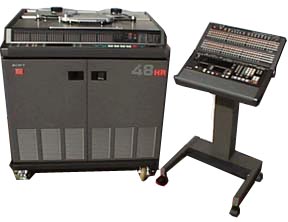
Sony 3348HR digital audio tape recorder image from Bobby Owsinski's Big Picture blog
Sony 3348HR Digital Tape Recorder and Remote
I remember when the commercial studio world revolved around the Sony 3348 48 track digital tape recorder. If you owned a studio that catered to major label clients, this machine was an absolute necessity, and at a cost of around $250k each, they were a major investment that a studio owner had to make to stay in business - for about 6 months. It seemed that as soon as every major studio finished their investment cycle with these machines that their use and value fell like a rock, thanks to the rapid transition in the music world to Digidesign's Pro Tools digital audio workstation as the storage medium of choice.

Today you can find a 3348 for a couple of grand, but most owners would probably even pay you to take the big bulky hulk of metal off their hands. This one-time superb piece of audio technology became a boat anchor in almost no time, and unlike analog gear from that era, has virtually no chance of having new life breathed into it via the vintage market. It sounded great for it's time, but it's quality and function is not even in the ballpark of what we can buy today for a mere fraction of its original cost.

Pro Tools has gone on to completely change several areas of the audio business, from music to broadcast to post, and has become the de facto standard in most professional settings. That said, it's now owned by Avid, a company previously known for it's video editing software (the video equivalent of Pro Tools) than anything else. The problem is, Avid is in trouble.

Avid's trouble started when Apple introduced Final Cut, which was cheaper than anything that Avid had to offer and eventually just as capable. Soon the market was saturated between the two systems, with virtually no growth left, so Avid purchased Digidesign to get a piece of the still growing professional audio market. Eventually that topped out too, so the next move was to go into consumer audio and Avid acquired M-Audio among other similar companies. To many of Avid's stockholders, the company was on a roll as stock prices reached a high of over $28.

But the audio business, consumer and professional combined, is actually quite small compared to other businesses, and once again Avid was undermined by Apple and their Garageband software and less expensive versions of Logic. Suddenly the stock was in trouble and began to drop like a rock. Earlier this year, the company decided that it had enough of the consumer business and sold it off in order to stop the stock price hemorrhage. The existing professional audio and video market is pretty finite though, and competition is tough, which means that Avid's revenue has fallen from a high of $12+ this year to just half of that today as investors continue the rush to sell. They understand the stock price isn't coming back.

Which brings us back to the Sony 3348. You can own the market and almost overnight lose it if something newer, cheaper, and better (or two of the three) comes along. You can also lose it if the company is struggling financially and there's no money left for innovation. I think you can see where this is going - Avid is in trouble.

In recent months long time Avid employees have been jumping ship for other companies in the industry, seeing the writing on the wall. That's never a good sign. And the company didn't even show at the last AES convention in San Francisco a couple of weeks ago. Not a good sign either.

I don't think that Pro Tools would ever go away overnight the way the Sony 3348 did because the installed user base is so high (especially in post and broadcast), but I wouldn't be surprised if we see some changes in the company in the very near future. One thing I do know, there are a number of other companies out there circling like vultures preparing to pick up the pieces of Digidesign, whatever they may be.

Watch this story carefully over the next few months.

----------------------------------

You should follow me on Twitter for daily news and updates on production and the music business.

Don't forget to check out my Music 3.0 blog for tips and tricks on navigating social media and the new music business.

Wednesday, November 7, 2012

Will The 4 Armed Robot Drummer Replace A Human?

Drummers absolutely hated drum machines where they first came on the scene, threatened by their perfect time. After a while, most learned to embrace the machine and live with it, with most drum machines getting jobs that a real drummer would never have gotten anyway.

But what happens when you have a robot that plays with perfect time? Here's a video of a 4 armed robot drummer doing his best Tommy Ramone imitation of "Blitzkrieg Bop," which I don't think will have drummers quaking in their boots -- yet. Notice that it (he?) never plays any fills, and the feel is very eh, robotic.


----------------------------------

You should follow me on Twitter for daily news and updates on production and the music business.

Don't forget to check out my Music 3.0 blog for tips and tricks on navigating social media and the new music business.

LinkWithin

Related Posts Plugin for WordPress, Blogger...